 ShiftPlanning
Fair shift scheduling,
without the complexity
Upload your team config, generate a balanced schedule, export to PDF or Excel. Free, no login, no database.
Why fair shift scheduling matters
For small teams running cafés, restaurants, retail shops, or clinics, the monthly roster is one of the most disproportionately important documents in the business. It decides who works which weekend, who closes which Friday, and whose preferred days off get honoured. Get it right, and people barely notice. Get it wrong, and you spend the next month repairing trust that should never have been damaged.
Most schedules drift into unfairness slowly. The same person closes every Thursday because they are reliable; the new hire ends up with three weekends in a row because their preferences were never logged; the senior staff member quietly resents that the junior staff member was given the same shift count, even though they earn very different salaries. None of these decisions felt unfair in the moment they were made. Together, they undermine the team.
ShiftPlanning was built around the idea that fairness is not a single number — it is a bundle of comparisons your team makes every time the next roster lands. The tool checks those comparisons explicitly: shift count, weekend distribution, consecutive working days, preferred shift fit, skill coverage. The output is a schedule whose imperfections you can defend, instead of a schedule whose imperfections you have to apologise for.
It is free, it runs entirely in your browser, and your data never leaves your computer. That is not a marketing line — it is the architecture. There is no account, no database, and no central record of your team. You upload a spreadsheet, the algorithm runs, and you download the result.
Everything you need to schedule shifts
No login required
Your data stays in your browser. Load a config file, generate, export. Nothing sent to a server.
Smart scheduling algorithm
Greedy assignment with fairness rebalancing. Respects leave, skill constraints, consecutive-day limits, and carry-over.
Multi-shift types
Configure DAY / EVENING / NIGHT shifts with custom time ranges. Automatically prevents overlapping assignments.
Excel config file
All settings saved in a standard .xlsx file you own and can version-control. No vendor lock-in.
Edit & lock slots
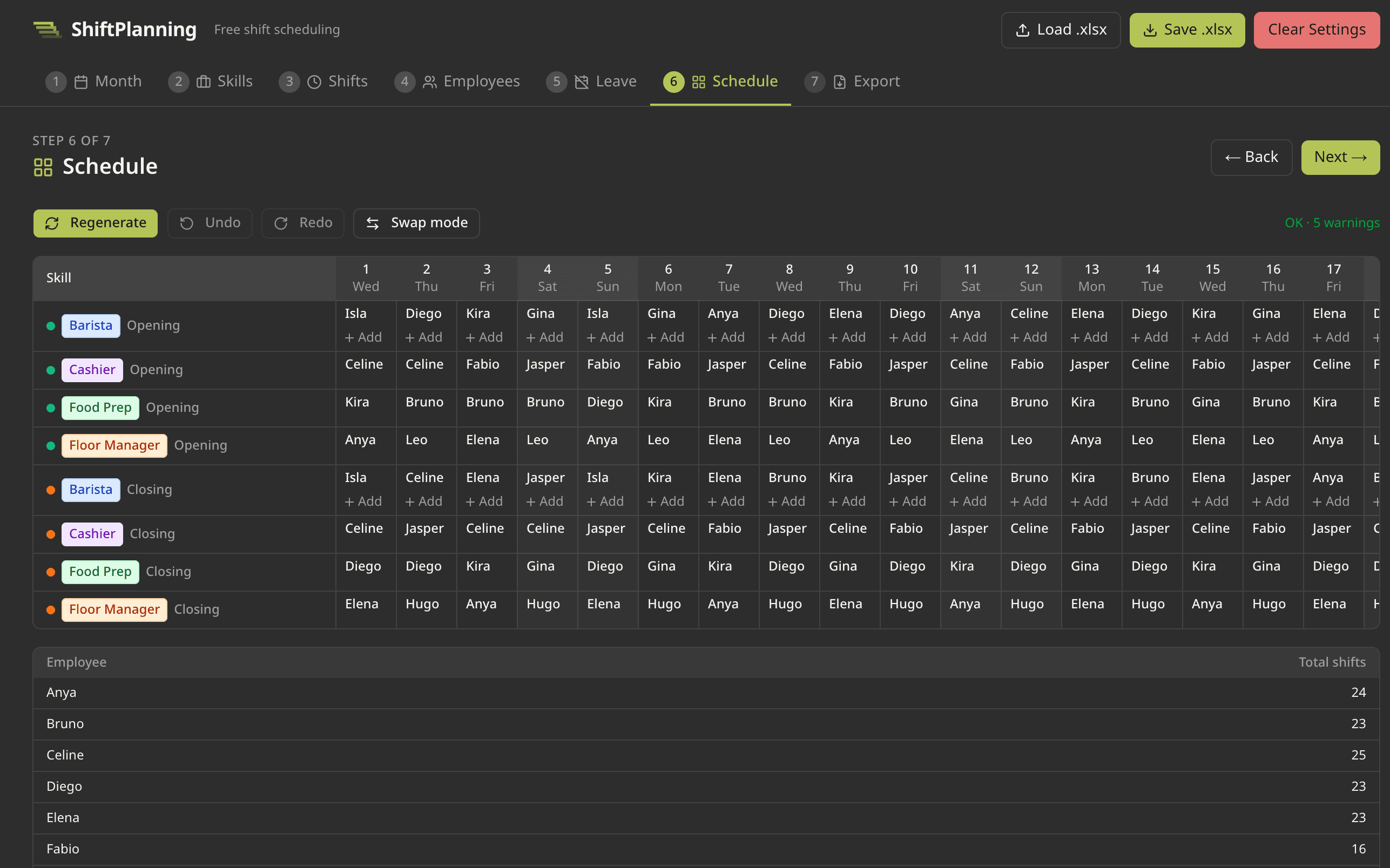
Replace, add, remove, or swap assignments manually. Lock slots to keep them fixed during regeneration.
Export to PDF & Excel
Download the final schedule in the format your team needs. Print-ready PDF or Excel for further editing.
See it in action
A clean, tab-based tool that runs entirely in your browser — no install, no account.
How it works
- 1
Download a template
Start from one of 7 starter templates or build from scratch.
- 2
Fill in your team
Add employees, skills, shift types, and leave requests to the .xlsx file.
- 3
Generate
Upload the file and click Generate. The algorithm assigns shifts fairly in seconds.
- 4
Export
Fine-tune manually, then export to PDF or Excel for distribution.
From the resources
In-depth writing on fair shift scheduling and team management.
How to build a fair shift schedule for a small team
What fairness means in practice, the trade-offs between workload balance and operational needs, and the common pitfalls that quietly erode trust in a roster.
7 min read →
Running multi-shift operations: day, evening, and night scheduling
How shift overlap rules, fatigue, handovers, and regulation interact when your business runs more than one shift per day.
8 min read →
Handling employee leave requests in shift-based workplaces
Workflows for time-off requests, capacity planning, last-minute swaps, and how leave interacts with mandatory coverage.
7 min read →
Frequently asked questions
Is ShiftPlanning really free?
Yes. Every feature is available to every visitor at no cost. The site is supported by advertising. There is no paid tier, no premium features, and no plan to introduce a paywall.
Do I need to create an account?
No. There is no login, no sign-up, and no account system. Your team configuration lives in an Excel file on your computer; the tool runs in your browser. We never see your data because there is no server to send it to.
Where is my data stored?
On your device. The tool keeps a working copy in your browser’s local storage so the page can pick up where you left off after a reload, and the canonical record is the .xlsx file you save. Nothing is uploaded to a server we control.
How big a team does it work for?
It is designed for teams of 3 to about 50 people, scheduling by skill across one to three shift types per day. Larger or more complex operations may benefit from dedicated workforce-management software.
What does the algorithm actually do?
It runs a greedy assignment pass, then iterates a fairness rebalancing loop. The rebalancer trades assignments between people to reduce variance in shift counts, weekend distribution, and skill coverage. The full mechanics are explained in our resources article on scheduling algorithms.
Can I edit the schedule manually after it generates?
Yes. You can replace, add, remove, lock, or swap any assignment in the generated grid. Locked slots are preserved on subsequent regenerations.
What file formats can I export?
You can export the full schedule as an Excel workbook with one sheet per employee, or as a print-ready PDF with one page per employee. The configuration itself stays in the standard .xlsx format you uploaded.
What languages does the tool support?
The interface is currently in English. The tool is fully unicode-aware, so employee names, skill names, and shift labels in any language work without modification. Translation of the interface is on the roadmap.
How do I report a bug or request a feature?
Email us at tharathip.kul@gmail.com. Include your browser, what you were trying to do, and what happened instead. Feature requests are read and tracked even when an immediate reply is not possible.
Is the source code available?
The scheduling algorithm and constraint logic are documented in our resources articles. The full source is not currently public, but the data format is open: any tool that can read Excel can read the configuration files ShiftPlanning produces.